

Reading Our Outage Map
Want more information during an outage?
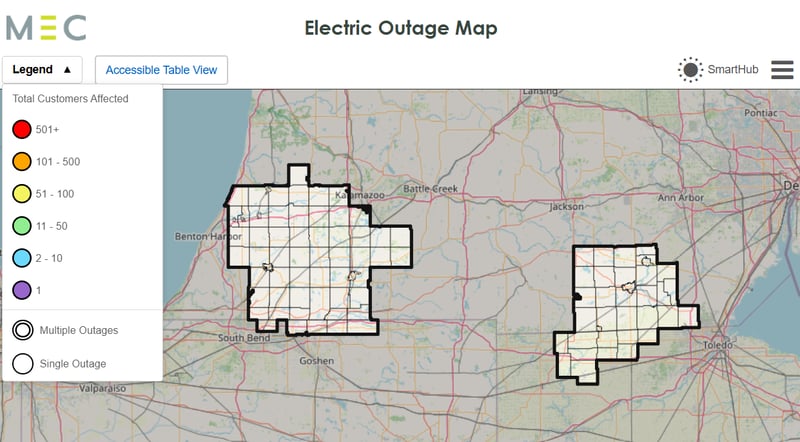
Our electric outage map can tell you how many people near you are out of power.
Legend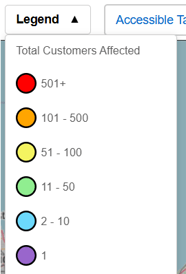
This button tells you how many customers each color represents when an outage dot is displayed on the map. For example, if a region is green, it means between 11 and 50 customers are out of power there.
It also notes that if an outage dot has two circles around it, it means the dot represents multiple groups of outages that may not have the same cause. Zooming into the map may cause these dots to separate, displaying individual outage groups.
Outage Dots
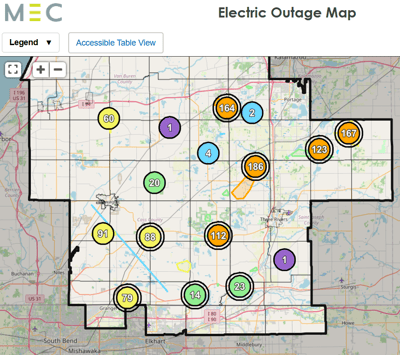
The map shows a dot for each outage group. Clicking on one of these
dots will tell you when the outage was reported.
Please note: Our outage reporting system groups outages together if they appear to have been caused by the same issue. This means that one big red dot is generally faster to repair than several smaller dots, because there’s only one problem to fix.
In rare cases, your outage may have a different cause than surrounding outages. If you get a notification that your power is back on, and it’s not, please re-report your outage so our crews can take another look.
Summary Box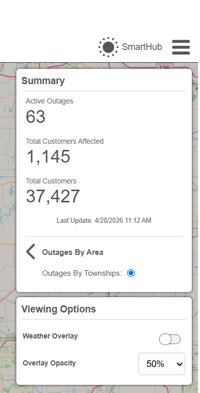
By clicking the menu button (the three lines in the toolbar),
you can display the outage summary.
This box lists the number of active outages, as well as the total number of customers affected. Turning on the Weather Overlay toggle will display radar data from the National Oceanic and Atmospheric Administration (NOAA).
Further Information
Clicking the arrow next to Outages By Area in the outage summary box gives you a list of townships with at least one customer out of power, as well as the total number of customers in those areas.
Has My Outage Been Reported?
To see if your outage has been reported, log into your SmartHub mobile app. Then:
-
Tap the menu button in the upper-left corner.
-
Go to Contact Us > Track Issue Status > Power Outage.
Here you can see your most recent outages, as well as when they were reported and which service address they were for. If they’ve been restored, this page will give you a time. If you don’t see your current outage on this page, report it:
-
Tap the menu button.
-
Go to Contact Us > Inquiries & Service Work > Power Outage.
-
Complete any remaining steps to report your outage.
How We Restore Power
Once outage reports start coming in, dispatchers send crews to assess the damage and determine the equipment needed for repairs. Sometimes, the full extent of the damage isn’t obvious until crews begin their work. This is why we can’t always offer estimated restoration times, especially in the beginning. Think of it like remodeling your house: You don’t know exactly what you will encounter until you start tearing down walls.
To make repairs, crews start with substations and major lines, working their way down to individual homes like yours. If you see trucks near your property and they leave before you’re restored, they’re either continuing repairs further down the line, or they’re repairing a larger part of the outage before returning to your specific property.
We have linemen on call 24/7/365 to work on repairs after hours. We also have mutual aid agreements with other co-ops, which means their crews help us restore power during major storms affecting our customers, and vice versa.
An Important Reminder
Please stay at least 50 feet away from electrical equipment (about the length of a semitruck). Even if a line isn’t down, coming too close is an unnecessary risk. There could be damage that you don’t see, and the line or pole could fall in an instant.
If you’re trying to report a problem with equipment and need to get a pole number, use your phone’s camera to zoom in so you can read it.